Half duplex UART from single AVR pin

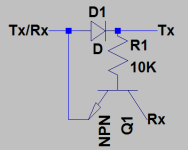
Smaller microcontrollers like Attiny84 microcontrollers don’t have UART interfaces, and you may not need them in many cases. But if you want a USART option, you will need to use software USART library or write your own routines. You can find many great software USART libraries for that purpose. As a rule, you will have to use two pins to establish communication. But if you are tight on I/Os, you can cheat a little and make it work from a single pin. Ralph has been experimenting with the simple but intelligent circuit, which allows performing half duplex UART communications with other systems. The whole trick lies in a small schematic made of diode, transistor and resistor. Diode is only for making one way TX signal path from MCU to other device. The resistor is only for limiting base current. All is left a transistor which works as a key. We need to remember that when the serial line is inactive, it stays in the high state. So when microcontroller transmits data, TX on the right keeps transistor open. Thus if…

Continue reading

How SalvageData salvaged my business trip in Chicago

It’s incredible how things have their way of turning out, irrespective of how well you plan ahead for them. My business trips always tend to be great lessons about the importance of not assuming anything and preempting situations. My travel to Chicago for an all-important client presentation about my company’s manufacturing capabilities proved to be no different. I was soon struggling with troubles I’d not anticipated earlier. Problem with my Drive It was only a stroke of luck when I thought I’d go through my final edit in Chicago rather than waiting to reach New York, where the presentation was supposed to happen a week later. I had barely plugged my portable hard drive into the laptop through its cable when I noticed how it was taking longer than usual for the laptop to detect the drive. My heart was in my mouth as the wait grew longer. It was only when a strange gurgling sound started coming out from the hard drive that I realized that trouble had struck. It was with a heart dripping with fear that I…

Continue reading

Using Volatile keyword in embedded code

Volatile is probably the least documented keyword in most tutorials and books. This is the primary cause of most misuses and bugs related to it. If you already are programming microcontrollers, you probably know that volatile is always used on global variables that are accessed from interrupt service routines. Otherwise, code won’t work. After few requests, I decided to drop few lines about volatile keywords. This keyword is commonly used to tag memory type. We hear “volatile memory” and “non-volatile memory” when discussing computer hardware. As a quick reminder – “non-volatile memory” is a type of memory that stores its contents even when power is off. Such type of memory is EEPROM, Flash, and FRAM. This is easy from a hardware perspective. But what volatile keyword means in C or C++ code? This is an indicator (called qualifier) to the compiler that tells that this variable may be changed during program flow even if it doesn’t look like it be. This means that compiler must treat this value seriously and keep optimizer away from it.

Continue reading

Software Debouncing of buttons

Connecting a button as an input to a microcontroller is a relatively easy task, but there are some problems. The main problem is that switches bounce, i.e., when you press (or release) a button, it will often change level a couple of times before it settles at the new level. So if you, for example, connect the switch to a pin with an external interrupt enabled, you will get several interrupts when you press the button once. This behavior usually is not wanted. Even if the buttons didn’t bounce (with filtering hardware, for example), we still want to capture the event of a pushed button and take some action once for every button press, so we need to keep track of the state of the switch as well. One technique used in this tutorial to handle this is to check (poll) the button(s) periodically and only decide that a button is pressed if it has been in the pressed state for a couple of subsequent polls.

Continue reading

Accelerometer Interfacing with AVR

ADXL335 size

The article covers how to interface an accelerometer with the atmega32/atmega16. Before proceeding, the user must know the basics of ADC (Analogy to digital converter) of the AVR. An accelerometer is an electromechanical device that measures acceleration forces. These forces may be static, like the constant force of gravity pulling at your feet, or they could be dynamic – caused by moving or vibrating the accelerometer. Accelerometers are of two types Analog and Digital. In this post, we will be discussing Analog accelerometers. They give voltage as output which is proportional to acceleration. The digital one gives the PWM output or direct binary digital data

Continue reading